 Pirogov Marketing
Why a More Expensive Lead Is Often the Cheaper Sale
A lower cost per lead does not mean a better campaign. When you factor in close rates, the campaign generating fewer, pricier leads often produces more closed deals at a lower cost per deal — and significantly more revenue on the same budget.
The situation you probably recognize
You’re looking at two campaigns in your Google Ads account. Both spend the same budget. One delivers 60 leads a month at $125 each. The other delivers 25 leads at $300 each. Your instinct, and your agency’s report, points to Campaign A as the winner. But your sales team is complaining that most of those 60 leads are a waste of time. Before you cut Campaign B’s budget, run one number you’re probably not running yet: cost per closed deal.
How cost per lead misleads B2B advertisers
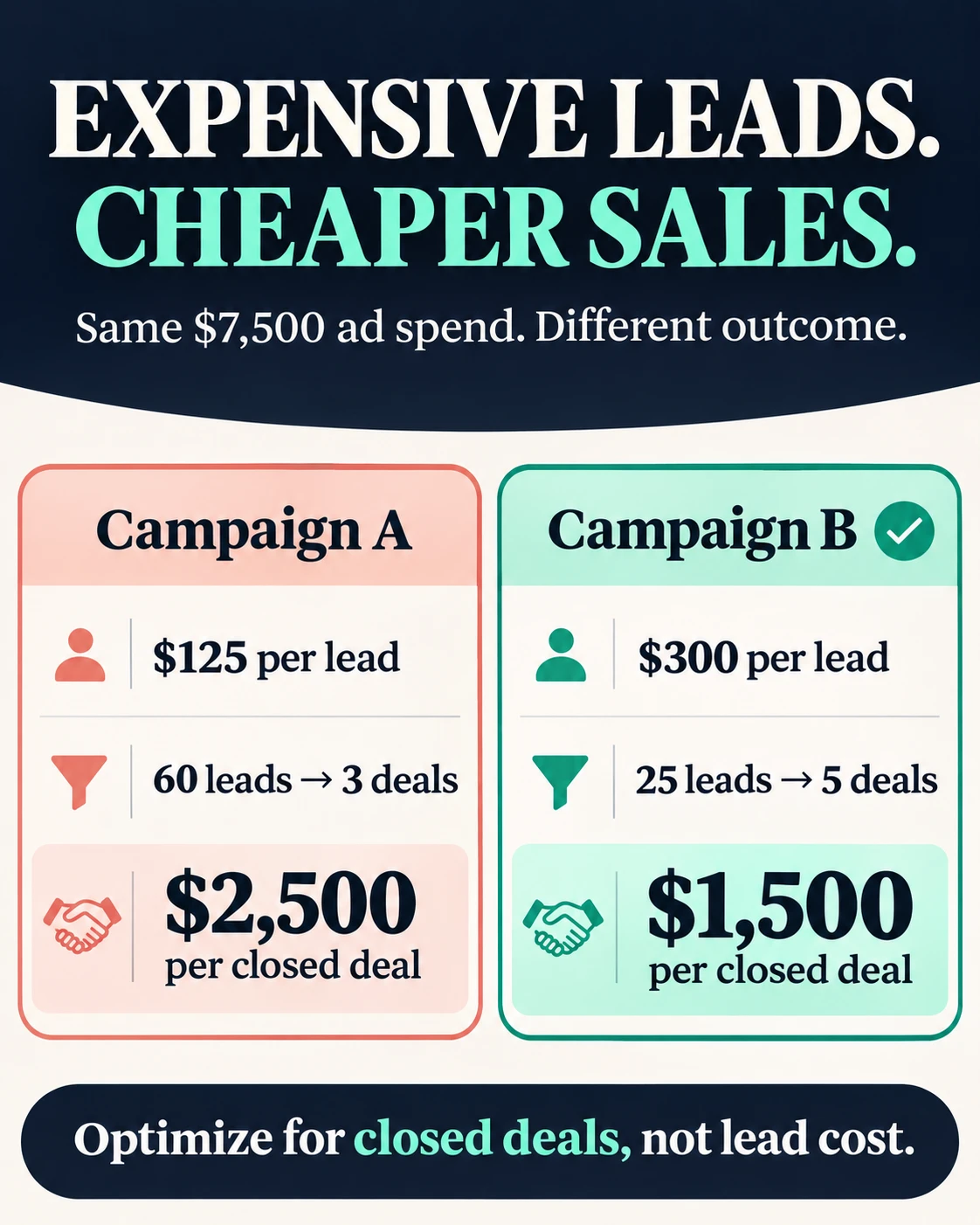
Illustrative example: each campaign spends $7,500 a month. Campaign A generates 60 leads at $125 per lead ($7,500 / 60). Campaign B generates 25 leads at $300 per lead ($7,500 / 25). Now apply close rates. Campaign A closes 5% of its leads: 60 x 5% = 3 deals, so cost per closed deal is $7,500 / 3 = $2,500 per deal. Campaign B closes 20% of its leads: 25 x 20% = 5 deals, so cost per closed deal is $7,500 / 5 = $1,500 per deal. Campaign A’s lead was 58% cheaper. Campaign B’s deal was 40% cheaper. The ranking flips completely. If your average deal is worth $30,000, Campaign A brings in 3 x $30,000 = $90,000 on $7,500 spent; Campaign B brings in 5 x $30,000 = $150,000 on the same $7,500. The “expensive” campaign just outperformed the “cheap” one by $60,000 in closed revenue.
What this means for your budget decisions
A cheaper lead is not automatically a better campaign. It only wins if its close rate holds up, and a lower price per lead often means a lower close rate. High-volume, low-cost leads frequently come from broader match terms or less targeted audiences, pulling in researchers, students, and competitors rather than buyers with budget and authority. Before you reallocate spend, confirm that the deals you are comparing are roughly equal in size, and that enough of the sales cycle has closed to make the close rate reliable. A campaign that has been running for three months inside a six-month sales cycle is not yet telling you the truth.
How to calculate cost per closed deal with your own numbers
Pull the Campaigns report in Google Ads. You need three columns: Cost, Conversions (your leads), and a close rate you get from your CRM, not from Google. In your CRM, filter leads by source, count how many reached “Closed Won,” and divide by total leads from that source. That is your close rate per campaign. Then:
Cost / (Conversions x Close Rate) = Cost per Closed Deal
If your CRM does not tag lead source, start there. Ask your team to log UTM source or campaign name on every new contact. Without that link, you are comparing campaigns blind.
Frequently asked questions
Is a lower cost per lead always a bad sign?
Not always. A low cost per lead is a good sign when the close rate is proportionally strong. The problem is that most B2B advertisers stop at cost per lead and never check whether those leads actually close, which means budget often flows toward the wrong campaign.
What close rate difference justifies a higher cost per lead?
The math is straightforward: if Campaign B costs twice as much per lead, it needs to close at more than twice the rate to produce a cheaper deal. In the example above, Campaign B cost 2.4x more per lead but closed at 4x the rate, which is why it won on cost per closed deal.
What if my CRM does not track lead source?
Start fixing that before you make any budget decisions. Ask your team to log the UTM source or campaign name on every new contact record. Without that connection between ad spend and closed deals, any campaign comparison you run is incomplete.
Ready to see which of your campaigns is actually winning?
If you have been optimizing toward cost per lead while your cost per deal tells a different story, the budget shift you need is hiding in a calculation your current reports are not showing you. If this sounds like your account, book a 20-minute call at https://calendly.com/pirohovmarketing/new-meeting and send me your site beforehand. I spend those 20 minutes on it and tell you the one thing I would fix first. If it makes sense to go deeper, there is a paid diagnostic after that.


